# VueJs - Interpolations
### Hi _vue_ and welcome to **VueJs, The Series** 🚀
---
> **Spoiler alert**🚨: In case you missed [VueJs - Getting Started][previous episode] go and check it out.
## What is Interpolation?
When we talk about interpolation, aka "String Interpolation", we talk about the "Mustache" syntax we saw in the [previous episode][previous episode], `{{ }}`.
There are 4 types of interpolations:
1. Text
2. JavaScript Expressions
3. Raw HTML
4. Attributes
## Text
We already saw it when we had this HTML.
```html
{{ title }}
```
Let's also bring our Vue instance for reference.
```javascript
new Vue({
el: "#app",
data: {
title: "I'm Interpolating!"
}
})
```
We see that Vue is accessing the _data_ property inside our Vue instance, is grabbing the _title_ and 'binding' it's value inside our `{{ title }}`. That's it, there is nothing else to see here. 👀
## JavaScript Expressions
Vue supports JavaScript expressions, so basically we can throw any JavaScript code inside.
```html
2 * 2 = {{ 2 * 2 }}
Today is {{ new Date().toDateString() }}
And the output is: {{ foo ? 'bar' : 'baz' }}
```
The output of the ternary? 🤷♂️
It will be _baz_ because _foo_ is undefined in our Vue instance, so is evaluated as false.
> ⚠Attention⚠, Vue will bind only one single expression, so the following code won't run.
```html
{{ let myVariable = 'be' }}
{{ if (foo) { return 'bar' } }}
```
The code above won't work because neither is JavaScript Expressions.
## Raw HTML
Until here we saw that whatever was inside our Mustache `{{ }}` was text, or interpreted as text, but what about if we want to bind some HTML? Imagine that we have a JSON where we have stored the content of the website, or we fetch it from the back-end. Most of the time, we will store the content as plain text, but sometimes we might get HTML instead.
For this, we will need to use the `v-html` **directive**. Don't worry, for now, we'll cover what directives are.
For the purpose of these tutorial let's put that HTML in our _title_ :
```javascript
new Vue({
el: "#app",
data: {
title: "
I'm Interpolating!
"
}
})
```
In our HTML now we don't need to grab the `{{ title }}` inside the `h1` tag.
```html
{{ title }}
```
As explained before, Vue will interpret this as text so the output will be 👇
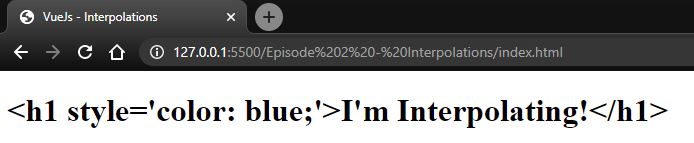
What we need to do in order to see our HTML as HTML is the following:
```html
```
We used an HTML tag, in this case, a `span`, inside its opening tag we added our directive `v-html`, and as a value, we passed our `title`. What Vue will do is to pass that value of `title` inside the span. Let's see if this time worked 👇
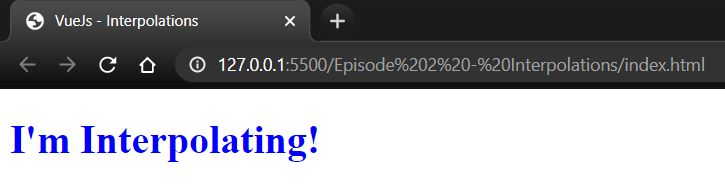
## Attributes
As we saw with the `v-html`, there are times when we need to pass certain values to our HTML, for that, we use directives. Imagine we have to put a dynamic `id`, inside of a `div` in our HTML. For this, we can use the `v-bind` directive. Again, don't worry, **directives will be cover in future episodes of this series**.
The syntax is quite similar as the previous example.
```html
```
Look how we add `:id` after `v-bind` to tell Vue that what we want will be this ``, well if dynamicId had the value of 1 😅
And we can do more with `v-bind`. Imagine we have a button that we want to show as disabled. All we have to do is to add `:disabled` at the end of `v-bind`. But for this, we won't give a value that Vue can interpret as a string. Vue needs to know if we want this button to be disabled, YES or NO, so will check if the value is true or false.
```html
```
In our case, `isButtonDisabled` is `undefined`, so Vue won't even render the attribute disabled, and this will happen if the value is also `null` or `false`.
## Conclusion
In this episode we covered the following:
1. We can do interpolations as plain **Text** with Mustache syntax `{{ }}`.
2. Inside the Mustache syntax we can have **JavaScript Expressions**.
3. To render **Raw HTML** we need the `v-html` directive.
4. We can dynamically change **Attributes** with the `v-bind` directive.
[GitHub repo][repository] for the code used in this episode.
---
>
**Did you enjoy this article?** Don't be selfish, go on and share the knowledge!
> You can also find me on Twitter [@eligarlo][twitter profile].
[repository]: https://github.com/eligarlo/VueJs-The-Series/tree/master/Episode%202%20-%20Interpolations
[twitter profile]: https://twitter.com/eligarlo
[previous episode]: https://blog.eligarlo.dev/vuejs-the-series-getting-started